
Key takeaways
Contactless payments allow clients to complete transactions by tapping a card, smartphone, or wearable device, or by scanning a QR code—eliminating the need to swipe or insert a card.
Technologies such as NFC and tokenization enable contactless payments to be processed quickly while protecting sensitive cardholder data.
Accepting contactless payment methods can help legal and accounting practices improve cash flow, streamline financial workflows, and create a smoother client payment experience.
Firms can begin offering contactless payments by selecting a compliant payment provider, enabling tap or scan-based options, and integrating payments with their existing practice management or accounting systems.
Clients today expect fast, convenient ways to pay for professional services. But for many firms, payment processes have not kept pace with these expectations. Waiting for mailed checks or manually entering card details into a payment terminal slows collections, delays deposits, and adds friction when it’s time to close out a matter or invoice.
Contactless payments have become mainstream, with Visa reporting that tap-to-pay transactions now account for more than half of in-person Visa payments globally. As many consumers grow accustomed to tapping a card or phone to complete a purchase in seconds, firms that offer these options are better positioned to meet client expectations and reduce payment delays.
This guide provides an overview of the best options for accepting contactless payments, how the technology works, and how it helps legal and accounting firms keep client data secure. We’ll also walk through the process of implementing modern payment solutions at your firm so you can start accepting contactless payments quickly.
What are contactless payments?
Contactless payments are fast and frictionless transactions completed without physically swiping, inserting, or handing over a payment card. Instead, payment information is transmitted wirelessly between a card, smartphone, or other device and a compatible reader, allowing funds to be securely transferred from the buyer’s bank to the merchant’s account.
How do contactless payments work?
Contactless payments follow the same basic authorization process as other card transactions, but the payment details are transmitted through a tap or scan rather than a swipe or chip insertion. When a client taps a card, phone, or wearable device, the terminal securely sends the payment data through the card network so the firm can receive the funds.
Key technologies associated with contactless payments include:
Near-field communication (NFC): A short-range wireless technology that enables a card or smart device to exchange encrypted payment data with a reader when held close to it.
QR code: A barcode image that can be scanned with a smartphone camera to open a link to a payment page or other website.
Tokenization: A security process that replaces sensitive card details with a unique digital token so the actual card number is not transmitted during the transaction.
For legal and accounting practices, a contactless transaction typically follows these steps:
The client is prompted to make a payment on a compatible reader.
The client taps a contactless card or device near the reader.
The payment data is encrypted and sent to the reader.
The reader transmits the encrypted data to the client’s bank.
The bank approves the payment, and the transaction is completed.
Contactless payment options for firms
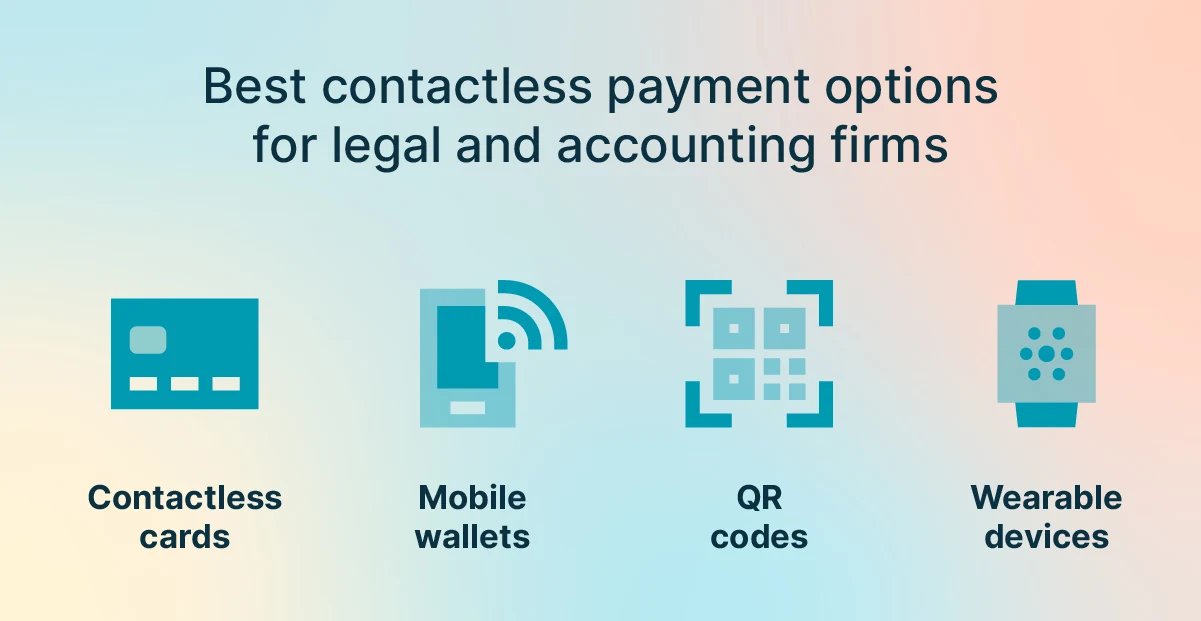
Several contactless payment options are widely available today, allowing firms to accept payments quickly while maintaining strong security. Here’s an overview of the most common ways professional services firms can offer convenient tap- or scan-based payments.
Tap-to-pay credit and debit cards
Many modern credit and debit cards include a built-in NFC chip that enables payments with a quick tap at a payment terminal. The chip transmits encrypted payment data when the card is placed within a short distance of the terminal. Once the transaction is approved, the payment is processed within seconds.
Mobile wallets (tap-to-pay with smartphone)
Smartphones can also be used to complete contactless payments through digital wallet apps that store a user’s credit or debit cards. Popular mobile wallets include Apple Pay, Google Pay, and Samsung Pay. When the phone is held close to the reader, the device securely transmits encrypted payment credentials to complete the transaction.
QR codes
A QR code can direct the payer to a secure online payment page without requiring a physical card tap. Firms can display the code on an invoice, payment terminal, or printed sign in the office. After scanning the code with a smartphone camera, the payer is taken to a payment screen where they can complete the transaction.
Wearable devices
Devices such as smartwatches can also be used to authorize contactless payments. These wearables rely on the same NFC tap-to-pay technology used by mobile wallets, allowing the user to hold the watch near a payment terminal to complete the transaction. Although wearable payments are less common than cards or smartphones, they provide another convenient option for clients.
Payment Option | Description | Benefits |
Contactless credit and debit cards | Tap-enabled cards transmit payment data via NFC when placed near a terminal. | Fast in-person payments using the same cards most clients already carry. |
Mobile wallets | Digital wallets store payment cards on a smartphone for tap-based payments. | Convenient phone-based payments with built-in device authentication. |
QR codes | A scannable code opens a secure digital payment page on a smartphone. | No physical card needed; easy to display on invoices or signage. |
Wearable devices | Smartwatches and similar devices use NFC to authorize tap payments. | Hands-free convenience for clients who prefer connected wearable devices. |
Why contactless payments are secure
Contactless payment systems incorporate several layers of protection that help keep cardholder information secure during each transaction. These controls limit how payment data is transmitted, reduce exposure of sensitive details, and require verification steps when appropriate.
Several features contribute to the security of contactless payment technology:
Short transmission range: NFC payments only work when a card or device is held a few centimeters from the terminal, limiting the risk of interception.
Encrypted payment data: Payment credentials are encrypted during transmission so the information cannot be read if intercepted.
Tokenization: Most contactless systems replace the actual card number with a temporary digital token, preventing sensitive card details from being shared with the merchant.
No physical card exchange: Because the card or device remains in the payer’s possession, others cannot view or copy the card number during the transaction.
Device authentication: Mobile wallets and wearable devices typically require a passcode, fingerprint, or facial recognition before a payment can be authorized.
Additional verification for higher-value transactions: Payment networks may require a PIN, a signature, or other identity verification for transactions above a certain amount.
How contactless payments benefit firms
Along with offering convenience for clients, contactless payments can improve many aspects of how professional services firms manage billing and collections. Here’s an overview of the key ways these payment methods can benefit legal and accounting practices.
Steady cash flow
Faster payment methods help firms collect funds more quickly, reducing delays caused by mailed checks or follow-up reminders. When clients can complete a payment in seconds during a meeting or at the front desk, invoices are more likely to be settled immediately.
Enhanced client experience
Offering tap- or scan-based payment options aligns with the expectations many clients now have when making purchases or paying bills. Providing these options can make transactions feel smoother and more convenient during in-person visits.
Improved firm efficiency
Contactless transactions typically take only a few seconds to process, which reduces time spent handling payments at the office. Faster checkout also allows staff to spend less time managing manual payment entry or processing paper checks.
Better safety and security
Because the card or device remains in the payer’s possession, contactless payments reduce the risk of card details being copied or mishandled. The encryption and authentication built into touchless payment systems also help protect sensitive financial information during each transaction.
How to set up contactless payments for your clients
Implementing contactless payments at your firm does not require a major technology overhaul. Modern payment platforms make it possible to adopt these options quickly and incorporate them into existing billing processes.
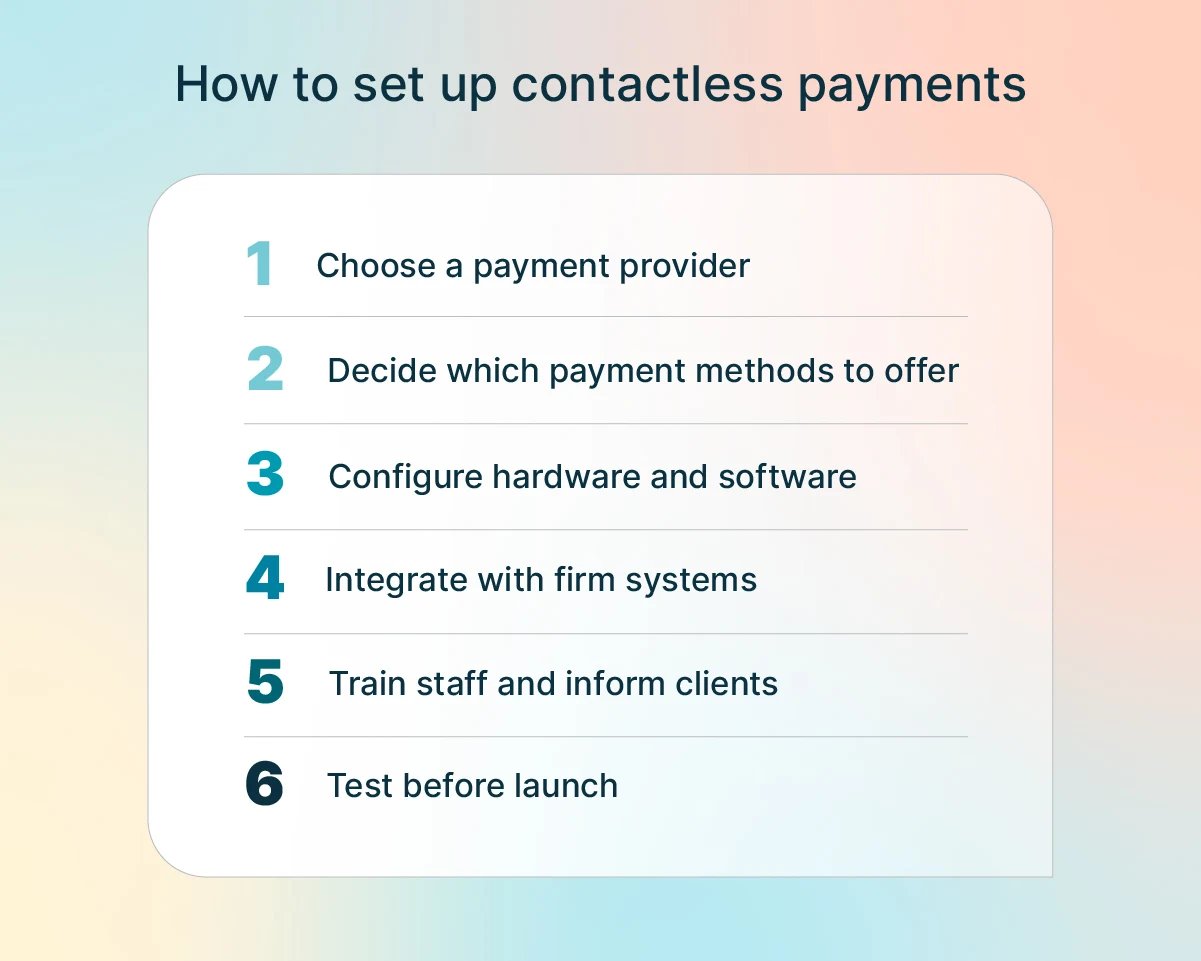
Here is a basic step-by-step process you can follow to start accepting contactless payments from your clients:
Choose a payment provider. Select a processor that supports contactless payments while meeting applicable compliance requirements. Platforms designed for legal or accounting firms often include features tailored to those industries’ billing workflows and regulatory standards.
Decide which contactless options to offer. Determine which methods best fit your firm’s processes, such as tap-to-pay in the office, mobile wallets, QR codes, payment links, or a combination of these options.
Set up an in-person payment terminal and necessary software. Install a payment terminal for in-person transactions—or use a mobile app to accept payments from a smartphone or tablet—and configure your payment software to enable the contactless payment methods you’d like to accept.
Integrate payments with your existing systems. Connect your payment solution to your practice management and accounting software so transactions are automatically recorded and financial records remain current.
Train your staff and inform clients. Ensure staff know how to process contactless transactions and let clients know these payment methods are available during meetings, billing discussions, or invoice delivery.
Test the payment process before launch. Run a few test transactions to confirm that payments process correctly, deposits arrive as expected, and reporting functions are working properly.
Explore contactless payments with 8am™ LawPay and 8am CPACharge
Contactless payments offer firms a faster, more convenient way to collect funds while meeting the expectations of today’s clients. For legal and accounting professionals, these payment methods can help reduce billing delays and simplify the overall payment experience.
Payment solutions from 8am—LawPay for law firms and CPACharge for accounting professionals—make it easy to incorporate contactless payments into your billing workflow, including in-person tap-to-pay transactions, QR code payments, and mobile payment processing.
To see how 8am payment solutions enable faster, more convenient payments for your firm, contact us to schedule a demo today.