

Key takeaways
Use action-oriented, value-driven CTAs that align with your audience’s intent and your firm’s brand.
Adjust your CTA language and placement based on the marketing channel—what works on email or social media won’t always work the same way on your website.
Reliable lead management tools are essential to turn interested leads into signed clients.
8am™ MyCase offers integrated intake, CRM, and reporting features to help law firms track, manage, and convert leads more effectively.
Some of the most effective law firm marketing strategies come down to a single sentence. Whether you're running paid ads, sending newsletters, or publishing blog posts, your call-to-action (CTA) is often the point where interest turns into engagement, and where potential clients decide whether to move forward or move on.
In this article, we’ll provide tips on how to write a strong lawyer call-to-action that aligns with your marketing goals, matches your brand, and motivates people to take the next step.
What is a call-to-action?
A call-to-action is a prompt that tells the reader exactly what to do next, whether that’s scheduling a consultation, downloading a guide, or getting in touch with your firm.
Law firms may use CTAs across all marketing channels, including their websites, emails, ads, and social media posts. They often appear as clickable buttons or text links that take visitors to scheduling pages, contact forms, or downloadable resources.
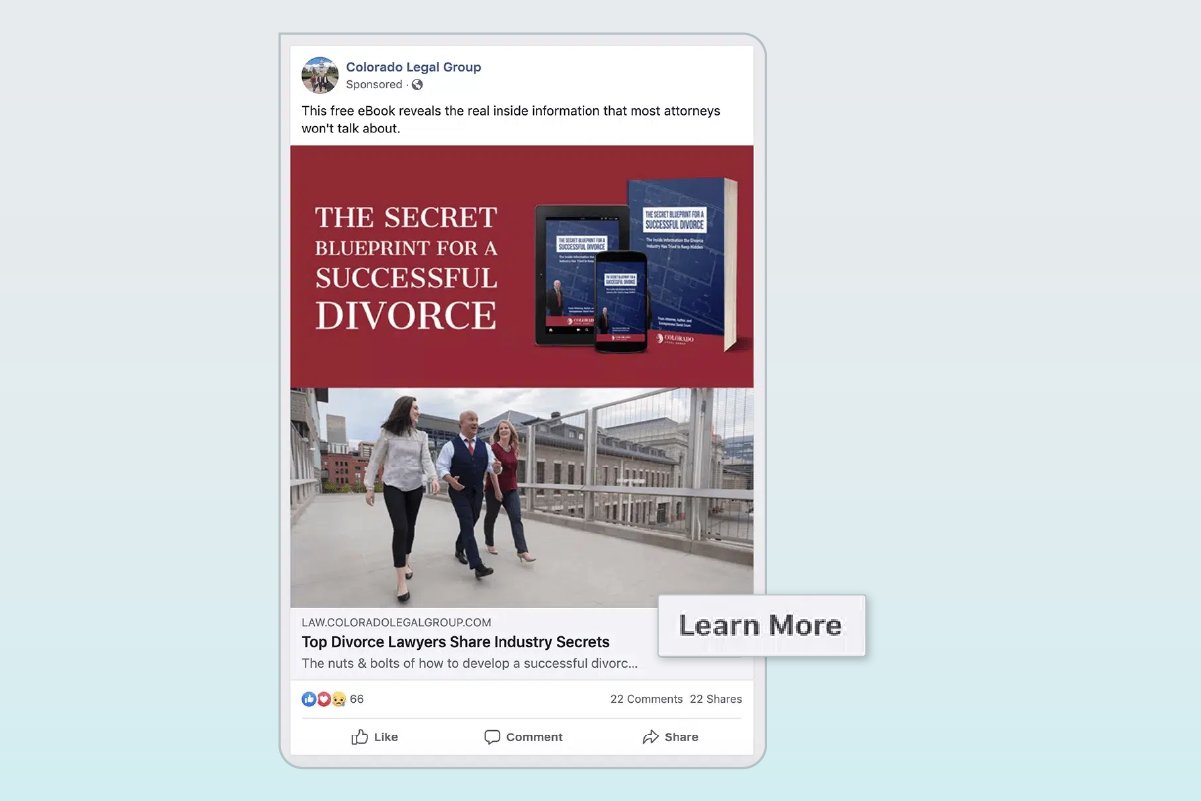
For example, the Facebook ad below includes a “Learn More” CTA button that leads readers to a page where they can download a free eBook.
Common examples of law firm CTAs include:
Schedule your consultation
Contact us
Learn more
Talk to an attorney
Request a case evaluation
Subscribe to our newsletter
CTAs boil down to a simple concept: If you give people clear direction on what they should do next, they’re more likely to take action. Implementing a lawyer call-to-action in your marketing materials can prompt more prospects to engage with your firm, pushing them down the sales funnel toward becoming clients. Ultimately, this can help your law firm become more profitable and support long-term growth.
Strategies for lawyers to write a strong CTA
Strong CTAs require thoughtful copywriting, strategic placement, and a clear understanding of your audience. While there’s no one-size-fits-all formula, certain call-to-action strategies for legal websites are particularly effective for helping firms drive engagement and convert leads.
Below, we’ll discuss six practical techniques to help you create CTAs that resonate with potential clients and reflect your firm’s unique positioning.
1. Include an action verb
Because you want your CTA to trigger an action, it’s best to use a precise verb that explains your recommended next step. For instance, if your goal is to increase consultation requests on one of your targeted landing pages, you might use a prompt like “Get your free case evaluation” or “Call to discuss your case now.”
Matching the tone of your CTA to the audience’s intent helps build trust and encourages action without pushing too hard. Rather than trying to make a hard sale in every CTA, incorporate some softer prompts to engage visitors who are still in the information-gathering stage
Call-to-action example
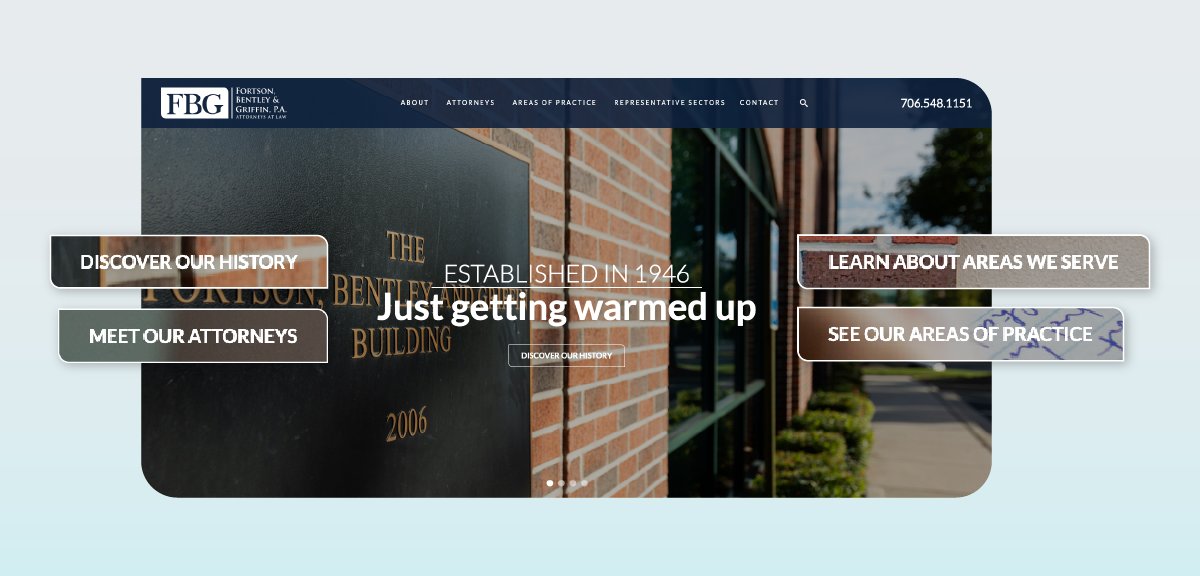
The homepage of the law firm Fortson, Bentley and Griffin, P.A. features a carousel of images, each with a different attorney call-to-action that leads with an action verb: Discover Our History; Meet Our Attorneys; Learn About Areas We Serve; and See Our Areas of Practice.
2. Use value-centric language
What’s in it for me? That’s the biggest question your prospective clients will have when looking at your marketing materials. Make it clear why they should take your recommended action. For example, you can use surrounding content to clarify your CTA’s value.
Call-to-action example
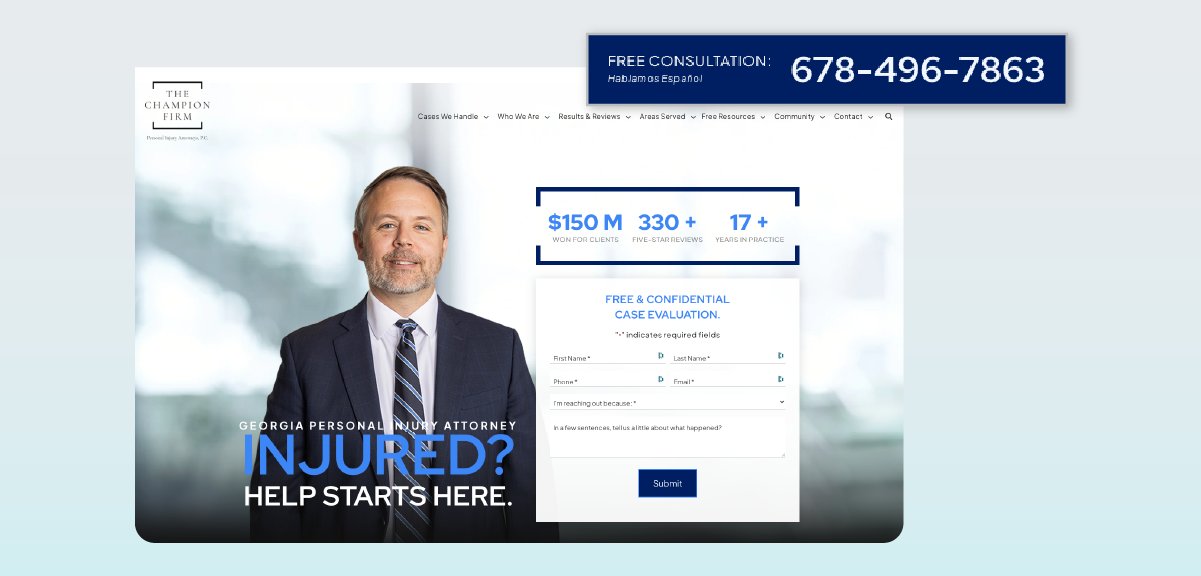
The Champion Firm uses this strategy by leveraging the word “free” in their homepage CTA to showcase the value to potential clients: They won’t have to pay anything for the evaluation.
3. A/B test various versions
The best way to improve your CTA is to test it. A/B testing lets you compare multiple versions by splitting your audience and measuring which one gets better results. Many website platforms used for law firm web design, including WordPress, offer simple plugins that allow you to create and test different versions of a button or headline without rebuilding your entire site. If you prefer a more comprehensive approach, consider using A/B testing software such as VWO, Optimizely, or Crazy Egg.
4. Tailor to your law firm’s brand
Your firm has its unique look and feel, and a CTA that jives with your brand will perform better. Aligning the tone, style, and placement of your CTAs with the rest of your site helps build consistency and trust, making it easier for potential clients to recognize your message and feel confident taking the next step.
Call-to-action example
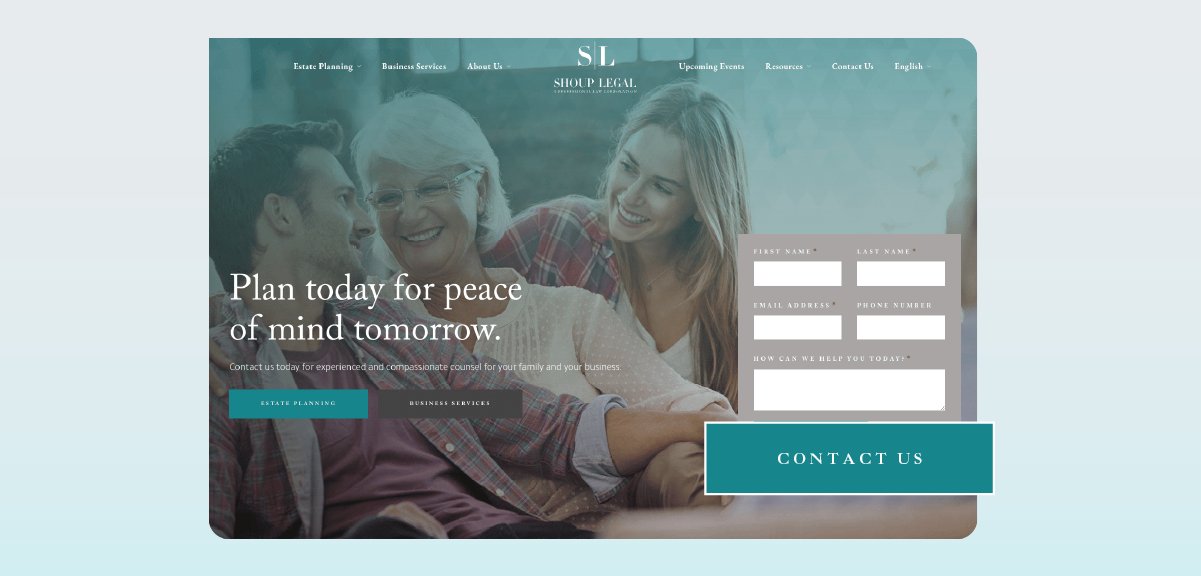
Shoup Legal positions itself as a family-friendly, compassionate estate planning firm. Their homepage focuses on helping clients achieve peace of mind, with an open-ended “Contact us” CTA button in a discreet color.
5. Customize content by client type
Let’s say you’re a personal injury lawyer. You serve various clients, such as car accident victims, patients and families affected by medical malpractice, and employees injured on the job. Consider creating a landing page for each of these audiences.
Each of these pages could include tailored content and a CTA that leads to a customized client intake form. Prospects are much more likely to engage with your firm if they see that you understand and can resolve their unique issue.
6. Personalize CTAs based on visitor behavior
You can take personalization a step further by using dynamic CTAs that adapt to each visitor’s behavior. If your website’s content management system supports audience targeting, it can display a more relevant call-to-action based on how someone interacts with your site.
For example, new visitors might see a prompt to sign up for your newsletter, while returning visitors could be offered a free consultation—reflecting their greater interest and readiness to engage.
Channel-specific CTA examples for law firms
To be effective, a call-to-action should align with the audience’s intent and the context of where they’re seeing your content.
For example, an “Explore our services” CTA button might work best for a website visitor looking for information about what your firm offers, while someone reading a promotional email might be more likely to respond to a directive like “Schedule your consultation.”
The technical capabilities of each marketing channel can also shape how CTAs are delivered. For instance, you could include multiple CTA buttons in different sections of your firm’s homepage, while your CTA on a social media post may appear as a single built-in “Call Now” or “Visit Website” button.
The law firm call-to-action examples below show you how to adapt messaging to match both the format and function of each channel.
Homepage CTAs
Your homepage is often the first impression for potential clients, so CTAs here should be easy to spot and directly tied to your firm’s primary goals. Place your main CTA in the hero section, keep it visible above the fold, and consider using a sticky header for consistent access as visitors scroll. It’s also helpful to offer multiple paths—such as “Schedule Now” and “Learn More”—without overwhelming the layout.
Law firm homepage CTA examples:
Call our team today
Explore our legal services
Get started
Start your claim
Practice area page CTAs
Practice area pages give prospective clients a focused view of the services your firm offers, making them a key opportunity for targeted calls to action. Instead of using generic prompts, tailor your CTA language to match the visitor’s likely intent: Determining whether your firm is the right choice for their specific legal issue. Effective CTAs for criminal defense websites, for example, often focus on confidentiality and immediate access to legal help.
You can also use practice area pages to cross-promote related services that may be of interest to these prospects. CTAs should appear in multiple places throughout the page, including sidebars, within content, and near FAQ blocks.
Practice area page CTA examples:
Speak with a personal injury attorney
Start your estate plan today
Learn what to expect in a custody case
Contact us to discuss your rights
Attorney bio page CTAs
Attorney bio pages can serve as high-intent entry points, especially when visitors are referred by name or are researching a specific lawyer’s experience. When possible, position CTAs near elements like credentials, case results, or testimonials to establish your credibility. Personalized CTAs—such as “Book with [Attorney Name]”—can help build trust and name recognition. Some practice management solutions, including 8am MyCase, allow you to customize intake forms for specific associates, which can be especially useful for attorney bio pages.
Bio page CTA examples:
Book a consultation with [Attorney Name]
Send a message to [Attorney Name]
Check availability
Tell us about your case
Email CTAs
Email campaigns often work best when they include a single well-placed call-to-action. Use CTA buttons for visibility, making sure to optimize button sizes and colors for recipients on mobile devices. Keep phrasing short and action-oriented, calling out a clear next step.
If possible, tailor your email CTAs by audience segment. For example, an email to prospective clients might include a prompt to schedule a call, while emails to existing clients could include links to information about new services and firm updates.
Examples of email CTAs for prospective clients:
Schedule your consultation
Learn how we can help
Meet our team
Examples of email CTAs for existing clients:
View our latest updates
See what’s new in your client portal
Refer a friend
Blog post CTAs
CTAs in blog posts should guide readers toward the next logical step based on their level of interest. Inline CTAs can be placed after key sections to encourage engagement without breaking the flow, while end-of-post prompts are ideal for scheduling consultations or promoting related services. You can also direct readers to related articles or invite them to subscribe for updates.
Blog post CTA examples:
Book a demo
Read our guide to estate planning
Subscribe for more legal insights
Content download CTAs
When you’re offering downloadable content, the CTA should typically focus on benefits to the reader. Provide a brief synopsis to give the audience a sense of what they can learn by downloading the resource. Use clear, value-driven language on buttons. If readers have to complete a form to download the asset, minimize the number of required fields (for example, name and email only). After the download, offer a follow-up action such as scheduling a consultation or viewing related content.
Content download CTA examples:
Download your free guide
Get helpful time-saving tips
Explore our free tools and templates
See what legal experts are saying
Social media CTAs
Calls to action on social media should be short, clear, and easy to act on. Because most platforms have limited space—and users tend to scroll quickly—CTAs should use concise, direct language like “Call now” or “DM us to learn more.” Be sure to adapt your phrasing and format to the platform you’re using. For example, Instagram doesn’t allow clickable links in captions, so you’ll often need to reference a link in your bio instead.
Visual design plays an important role as well. You can include CTA text directly in your post image or video (as in the example below), and take advantage of built-in platform features like contact buttons or message prompts. To track performance, use UTM links so you can see which posts are driving clicks, form fills, or consultations.
Social media CTA examples:
Tap to learn more
Have a question? Comment below
Watch how we helped a recent client
Know your rights—read more at the link in our bio

The importance of lead management systems for law firm marketing
A strong CTA may get someone to click, but without the right infrastructure to capture, track, and follow up with leads, law firms risk wasting valuable marketing efforts.
That’s where lead management systems come in. These tools help bridge the gap between a CTA and a signed client by automating intake tasks, organizing communications, and providing visibility into lead activity and conversion patterns. They also help firms understand which marketing channels are actually driving results.
Key features of lead management systems include:
Lead capture and routing: Collect contact info from forms, emails, or chats and assign it to the appropriate team member
Automated follow-ups: Send confirmation messages and reminders without manual effort
Lead tracking and attribution: Monitor where leads come from and track engagement across multiple touchpoints
Client portal integration: Allow clients to securely upload documents, message your firm, or schedule appointments
Here’s an example of how lead management systems guide prospective clients through each step of the intake process:
A prospective personal injury client clicks a Facebook ad CTA that says “Get your free case review.”
This takes them to a form that collects their contact information.
After submitting the form, they receive an automated email invitation to the firm’s client portal.
The prospect can then upload accident photos and other documentation with their mobile device.
The system routes the lead to the appropriate attorney based on the case details they provided.
Within minutes, the client receives a link to book a consultation.
The system logs each of these steps and attributes them to the specific marketing touchpoint where the lead originated, giving the firm full visibility into conversion data and marketing ROI.
Turning prospects into clients with 8am MyCase
Crafting a strong call-to-action is only the first step toward a successful client acquisition. To consistently convert interested prospects into signed clients, law firms need clear messaging, channel-specific strategies, and the right systems to support follow-through at every stage of the client journey.
With a built-in law firm CRM, customizable intake tools, and a secure client portal, MyCase is a comprehensive practice management solution that helps attorneys create a direct path from a CTA click to a retained client. It also gives firms access to detailed reporting on marketing ROI, lead sources, conversions, and other key business metrics.
One last CTA for good measure: Book a demo of 8am MyCase today. No commitment is required, and you’re free to cancel anytime.