
Getting paid on time shouldn’t feel like a second job, but for many professionals, it often does. Even with clear invoices and agreed-upon terms, it’s common to spend time sending reminders and waiting for payments to come through.
One of the simplest ways to reduce delays is to make paying as easy as possible for your clients. Payment links remove friction from the payment process, allowing clients to pay an invoice in just a few clicks—no portals, no checks to mail, and no unnecessary back-and-forth.
Below, we’ll break down what payment links are, how pay by link works, where they fit into your billing workflow, and how 8am™ ClientPay helps professional services firms collect payments more efficiently and securely.
What is a payment link?
A payment link (also called a pay-by-link) is a simple, shareable URL that takes your client straight to a secure checkout page where they can complete a payment without logging in to a portal or e-commerce platform. When a client clicks the link, they’re taken to a hosted payment page where they enter their payment details and finish the transaction.
Payment links can be sent through email, text message, social media, or embedded on your website, giving you multiple ways to make it easy for clients to pay. Some solutions even let you customize the payment page with your business name, logo, and contact info so clients recognize your brand before completing the payment.
The real value of payment links is convenience: Clients can pay with credit cards, debit cards, or other electronic methods at a time that works for them. As more clients expect digital payment options, offering payment links helps you meet those expectations and get paid faster.
With some online payment solutions, you get branded, secure payment links as part of a professional online payment solution built for service-based firms. ClientPay lets you securely accept major payment methods from anywhere, provides real-time receivables reporting, and helps improve cash flow while enhancing the client experience.
How do payment links work?
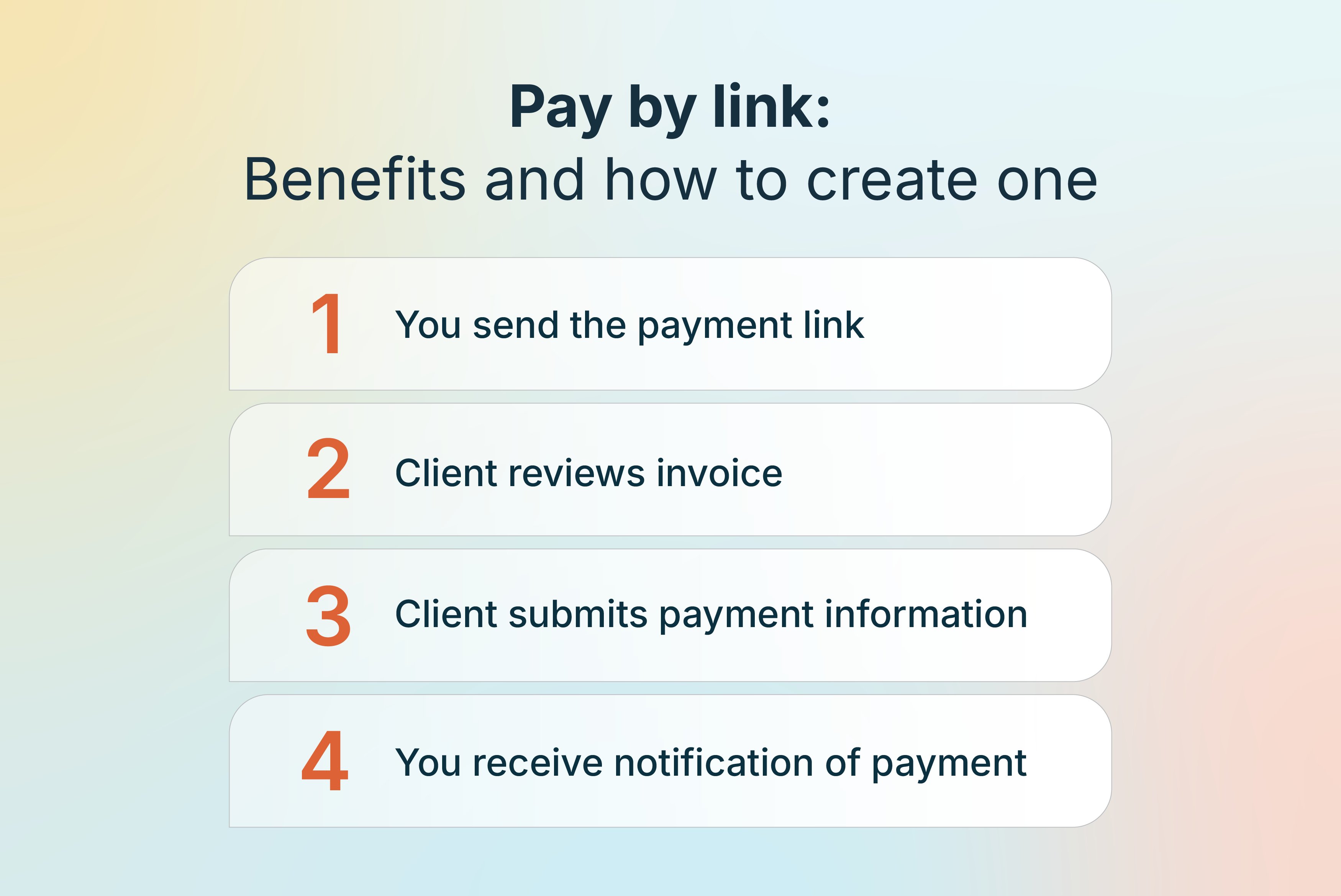
At a high level, payment links are designed to be simple for you and your clients. You start by creating a link through your payment provider, usually by entering the invoice amount and selecting the client or matter it applies to. Once the link is generated, you can share it with clients however you like.
When a client clicks the link, they’re taken to a secure checkout page where they enter and submit their payment details. If you offer an instant payment option, the experience feels even more seamless, allowing clients to complete their transaction right away without delays. Behind the scenes, the payment provider processes the transaction using encryption and other security measures. Once the payment is approved, the funds are deposited into your account—often within a short window—without any extra steps on your part.
Where can you utilize payment links in your business?
Another major benefit of payment links is their versatility. You can use them at multiple points throughout the client lifecycle to make paying fast and accessible. Common use cases include:
Email invoice
Email is one of the most popular ways to use payment links. You can send an invoice outlining your services and include a link so clients can pay immediately. Presenting the invoice and link together reduces friction and increases the likelihood of prompt payment.
Website
Your business website is a natural place to include a payment link. Many firms add a “Make a Payment” button to their homepage or client portal. When it’s time to pay, clients know exactly where to go.
QR code
QR code payments allow clients to scan a code with their phone and be taken directly to a secure payment page. This contactless option became more common during the COVID-19 pandemic and remains popular for its speed and simplicity. QR codes can be placed on invoices, emails, or even printed documents.
Text message
Payment links can also be sent via text message, allowing clients to pay directly from their phone. For busy professionals and clients on the go, text-based links can significantly reduce payment delays.
Are payment links safe?
Yes—payment links are safe when they’re created and managed through a reputable payment provider. Secure payment links use SSL/TLS encryption to protect sensitive information as it travels between your client and the payment processor, helping prevent interception.
Trusted providers also maintain PCI compliance, which means they follow strict industry standards for handling and protecting cardholder data. Because payment links send clients to a hosted checkout page, your business never sees or stores credit card numbers, significantly reducing your security exposure.
Many providers add another layer of protection through tokenization, which replaces sensitive payment details with encrypted tokens. Together, encryption, PCI compliance, and hosted payment pages make payment links a secure and reliable way to accept online payments.
What are the benefits of using pay by link, and is it worth it?
The faster and easier it is for clients to pay, the more likely they are to pay on time. Payment links remove unnecessary steps from the billing process and give clients fewer reasons to delay.
Pay by link is also easy to implement. There’s no technical setup, no website integration required, and no steep learning curve. Payment links work for flat-fee projects, retainers, and recurring payments alike.
From an operations standpoint, payment links help reduce manual bookkeeping. Digital invoices, online payments, and automatic reconciliation mean fewer administrative tasks and more accurate records.
Just as importantly, offering secure and convenient payment options reinforces your professionalism and client-first approach, leading to stronger relationships and more repeat business.
How ClientPay maximizes the effectiveness of payment links
ClientPay is designed to help professional services firms use payment links with confidence—without adding complexity to their billing process. With ClientPay, you can generate secure, branded payment links that take clients to a hosted checkout page displaying your business name and contact details, so every payment feels consistent and professional.
Beyond payment links, ClientPay supports faster and more flexible billing. Features like Quick Bill make it easy to send invoices on the fly, while scheduled payments let you collect fees over time for retainers, milestones, or recurring services. Built-in reporting tools and A/R dashboards give you real-time visibility into payments and outstanding balances, helping you stay on top of cash flow without extra manual work.
If you’re looking to offer clients a payment experience that’s simple, secure, and aligned with how your firm works, you can schedule a demo with ClientPay to see how payment links fit seamlessly into your workflow.